Running opencode with Local LLMs: From Ollama to oMLX on Apple Silicon

I spent yesterday trying to get opencode — a terminal-based AI coding assistant — running entirely on local models. No cloud APIs, no subscriptions, just my M4 Pro MacBook and open-weight LLMs. Here's what worked, what didn't, and the stack I landed on.
The Goal
Run an AI coding agent locally that can read files, execute bash commands, edit code, and reason about projects — all powered by models running on Apple Silicon. Think Claude Code, but offline and free.
Attempt 1: Ollama + opencode
The obvious first choice. Install Ollama, pull a model, point opencode at it.
brew install ollama
brew services start ollama
ollama pull qwen2.5-coder:14b

# Install opencode
curl -fsSL https://opencode.ai/install | bash
Configure opencode to use the local model in ~/.config/opencode/opencode.json:
{
  "$schema": "https://opencode.ai/config.json",
  "model": "ollama/qwen2.5-coder:14b",
  "small_model": "ollama/qwen2.5-coder:14b",
  "provider": {
    "ollama": {
      "npm": "@ai-sdk/openai-compatible",
      "name": "Ollama (local)",
      "options": {
        "baseURL": "http://localhost:11434/v1"
      },
      "models": {
        "qwen2.5-coder:14b": {
          "name": "Qwen 2.5 Coder 14B"
        }
      }
    }
  }
}
What I Learned the Hard Way
Thinking models are unusable for interactive coding. I first tried qwen3-coder:30b — a MoE reasoning model. It generates hundreds of hidden "thinking" tokens before every response. A simple "say hello" took 67 seconds. The GPU was running at 91 tok/s — it just wasted all that speed on invisible chain-of-thought. Switched to the dense Qwen2.5-Coder and response times dropped to 8 seconds.
Two models loaded = GPU contention. When opencode uses a different small_model (for titles/compaction) than the main model, Ollama loads both into GPU. On my 48GB M4 Pro, this caused sporadic 500 errors and 2-4 minute latency spikes. The fix: set small_model to the same as model.
Ollama defaults to 4K context. This breaks tool calling entirely — opencode's system prompt + tool definitions alone consume most of 4K tokens. You must create a custom Modelfile:
# Modelfile
FROM qwen2.5-coder:14b
PARAMETER num_ctx 32768
PARAMETER temperature 0.2
PARAMETER top_p 0.9

# Build it
ollama create qwen2.5-coder:14b-opencode -f Modelfile
CLAUDE.md instructions confuse local models. If you use Claude Code alongside opencode, the local model picks up CLAUDE.md instructions and tries to follow them — calling "skills", using PAI response formats, etc. The fix:
export OPENCODE_DISABLE_CLAUDE_CODE=1
Essential Ollama Environment Variables
# Add to your LaunchAgent plist (not .zshrc — Ollama runs as a service)
OLLAMA_FLASH_ATTENTION=1        # 87-98% less attention memory
OLLAMA_KV_CACHE_TYPE=q8_0       # Halves KV cache memory
OLLAMA_KEEP_ALIVE=-1            # Model stays loaded forever
OLLAMA_MAX_LOADED_MODELS=1      # Prevents GPU contention
OLLAMA_NUM_PARALLEL=1           # Single user, no need to split KV
The Problem with Ollama
Ollama uses llama.cpp with a Metal backend. It works, but on Apple Silicon you're leaving performance on the table. Apple's own MLX framework is purpose-built for unified memory — it achieves 1.5-2x faster token generation and 3-5x faster prompt processing compared to llama.cpp on the same hardware.
Attempt 2: oMLX — The MLX-Native Solution
oMLX is an open-source (Apache 2.0) MLX inference server built specifically for macOS. It runs from your menu bar and exposes an OpenAI-compatible API. The killer features:
- Continuous batching — up to 4x speedup under concurrent load
- SSD KV caching — persists cache to disk, so follow-up requests in long sessions stay fast
- Reliable tool calling — supports JSON, Qwen, Gemma, GLM formats
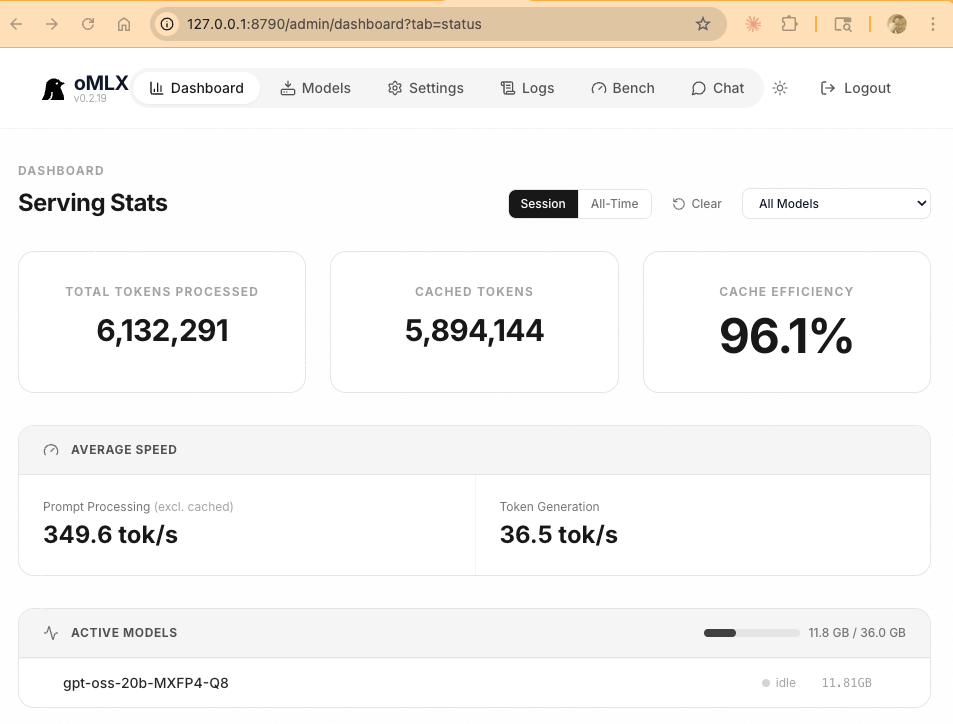
- 96% cache efficiency — the dashboard tells the story
Installing oMLX
# Download from GitHub releases
gh release download v0.2.19 --repo jundot/omlx --pattern "*tahoe.dmg" --dir /tmp

# Mount and install
hdiutil attach /tmp/oMLX-0.2.19-macos26-tahoe.dmg
cp -R /Volumes/oMLX/oMLX.app /Applications/
hdiutil detach /Volumes/oMLX

# Launch
open -a oMLX
The Winning Model: gpt-oss-20b
I tested several models for tool calling reliability — the key requirement for agentic coding. Results:
- Qwen2.5-Coder-32B — outputs tool calls as text content instead of structured API responses. Tool calling broken.
- Qwen3-Coder-30B (MoE) — tool calls work but thinking tokens leak into visible output. Noisy.
- gpt-oss-20b (MoE) — clean structured tool calls, both streaming and non-streaming. Winner.
gpt-oss-20b is OpenAI's open-weight model. It's a MoE architecture with only 3.6B active parameters out of 20B total — meaning it runs fast despite the larger total size. On my M4 Pro via oMLX: 63 tok/s generation, sub-second TTFT.
Download it through oMLX's Models tab (search for mlx-community/gpt-oss-20b-MXFP4-Q8) or via HuggingFace.
Configuring opencode for oMLX
Create ~/.config/opencode/opencode.json:
{
  "$schema": "https://opencode.ai/config.json",
  "model": "omlx/gpt-oss-20b-MXFP4-Q8",
  "small_model": "omlx/gpt-oss-20b-MXFP4-Q8",
  "provider": {
    "omlx": {
      "npm": "@ai-sdk/openai-compatible",
      "name": "oMLX (local MLX)",
      "options": {
        "baseURL": "http://127.0.0.1:8790/v1",
        "apiKey": "your-omlx-api-key"
      },
      "models": {
        "gpt-oss-20b-MXFP4-Q8": {
          "name": "GPT-OSS 20B (MLX)"
        }
      }
    }
  }
}
Tuning oMLX Settings
Edit ~/.omlx/settings.json to maximize context window:
{
  "sampling": {
    "max_context_window": 131072,
    "max_tokens": 131072
  },
  "cache": {
    "enabled": true,
    "initial_cache_blocks": 256
  },
  "scheduler": {
    "max_num_seqs": 8,
    "completion_batch_size": 8
  }
}
The gpt-oss-20b model supports 128K context natively, and with only 8 KV heads, the full 128K context uses just ~3GB of KV cache — well within the 48GB budget.
Performance: MLX vs Ollama
Same hardware (M4 Pro 48GB), same model class, real measurements:
| Metric | Ollama (llama.cpp) | oMLX (MLX) |
|---|---|---|
| Token generation | ~20-30 tok/s | 36-63 tok/s |
| Prompt processing | ~50-80 tok/s | 349 tok/s |
| Cache efficiency | None (recomputes) | 96% |
| Tool calling | Works | Works (model-dependent) |
| Memory usage | ~16 GB | ~12 GB |
The prompt processing difference is the most impactful for coding workflows. When opencode sends a large system prompt + file contents + tool definitions, Ollama takes 10-15 seconds to process it. oMLX does it in 2-3 seconds — and on repeat requests, the SSD cache makes it nearly instant.
The Final Stack
# The stack
oMLX v0.2.19          # MLX inference server (menu bar app)
gpt-oss-20b-MXFP4-Q8  # OpenAI open-weight MoE model
opencode v1.2.27       # Terminal AI coding assistant
ripgrep                # Required by opencode for code search

# Environment
OPENCODE_DISABLE_CLAUDE_CODE=1  # Don't load Claude instructions
Total cost: $0/month. Runs fully offline. 128K context window. Reliable tool calling. 63 tok/s generation speed.
Tips and Gotchas
- Never run Ollama in Docker on macOS — no Metal passthrough, 5-10x slower
- Close Chrome before loading 32B+ models — Chrome uses 4-8GB that your model needs
- Disable Spotlight indexing on model cache:
sudo mdutil -i off ~/.ollama - brew services restart overwrites your LaunchAgent env vars — use
launchctldirectly - MoE models > dense models for speed — gpt-oss-20b (3.6B active) outperforms qwen2.5-coder-14b (all 14B active) at generation speed
- Set OPENCODE_DISABLE_CLAUDE_CODE=1 — local models can't handle Claude's complex system prompts
- One model at a time — GPU contention from multiple loaded models causes random timeouts
What's Next
Ollama has an MLX runner in its codebase (behind --mlx-engine flag) but it's not exposed in the current release. When it ships, we'll get Ollama's model management + MLX's speed in one package. Until then, oMLX is the way to go for Apple Silicon users who want maximum performance from local models.